Learn Together: AI-Enhanced Study Groups
for Microsoft Learn

Overview
Learn Together is a conceptual feature designed to transform the Microsoft Learn platform by leveraging AI to foster collaboration and mutual support among learners.
This personal case study explores how AI can bridge the gap between individual and shared learning experiences. The concept envisions a feature that connects users tackling similar challenges, enabling meaningful collaboration through AI-powered peer matching, shared workspaces, and expert mentorship. By empowering learners to work smarter, not harder, this concept highlights the untapped potential of AI tools to create effective and impactful learning environments.
While this is a personal project and not affiliated with Microsoft, it embodies the principles of user-centered design, iterative development, and data-driven decision-making. Inspired by Microsoft’s mission to empower every person and organization to achieve more, this concept aligns with the company’s vision of driving innovation and inclusion.
My Role
Responsibilities: concept ideation, designing user flows, wireframing, and prototyping in Figma.
Tools Used: Figma, Microsoft Learn design framework.
Timeframe: Currently in progress
Problem Statement
"How might we empower learners to connect and collaborate using AI tools, creating a support system for shared problem-solving and learning?"
Key Features
1. AI-Powered Peer Matching
-
Dynamically matches learners based on shared challenges, tasks, or goals, ensuring they can collaborate on assignments or concepts efficiently.
-
Uses AI to identify complementary skill sets and learning objectives, creating high-value connections.
2. Collaborative AI Workspace
-
Provides a shared virtual workspace equipped with integrated AI tools for brainstorming, real-time editing, and solving tasks together.
-
Includes features like AI-generated prompts, collaborative document editing, and guided workflows tailored to shared tasks.
3. Expert Assistance
-
Allows learners to request guidance from subject matter experts or receive curated AI suggestions for crafting better prompts and solving complex problems.
-
Ensures timely support to help learners overcome obstacles and deepen their understanding.
4. Skill-Based Grouping
-
Groups learners by skill level or task type to maximize collaboration and reduce mismatched expectations.
-
Dynamically updates group composition based on progress and evolving user needs.
5. Progress and Collaboration Metrics
-
Tracks milestones, collaboration frequency, and task completion rates to provide learners with actionable insights into their learning journey.
-
Rewards collaboration through gamification, such as badges for participation and milestone achievements.
6. Explore and Expand
-
Enables learners to discover new study groups based on topics of interest or adjacent skills, broadening their network and exposure to different learning paths.
Design Process
1. Ideation:
-
Inspired by challenges in online learning, particularly the lack of collaborative tools for individuals using AI. The concept aims to bridge these gaps by facilitating peer support and expert guidance.
2. User Research:
-
Conducted informal surveys and discussions to understand learner pain points:
-
Difficulty navigating AI tools effectively.
-
Lack of collaborative opportunities for problem-solving.
-
The desire for accessible expert guidance.
3. Prototyping (In Progress):
-
Created static mockups in Figma showcasing user flows for peer matching, collaborative workspaces, and progress tracking.
-
Mockups align with Microsoft Learn’s existing design language to ensure seamless integration.
4. Iterative Refinement:
-
Plans to gather feedback from peers and potential users to refine feature designs and improve usability.
Metrics for Success (Projected OKRs/KPIs)
Objective: Enhance collaborative learning.
-
Projected Key Result 1: Achieve 80% user satisfaction in usability testing.
-
Projected Key Result 2: Increase task completion rates by 50% among matched learners compared to individual users.
Objective: Improve platform engagement.
-
Projected Key Result 1: Increase repeat visits by 30% among users accessing collaborative features.
-
Projected Key Result 2: Achieve a 20% increase in mentorship requests within three months of implementation.
Proposed Solution
Learn Together introduces features designed to:
-
Connect learners through AI-driven peer matching.
-
Provide shared workspaces equipped with collaborative AI tools.
-
Offer expert guidance to enhance prompt engineering and problem-solving.
-
Track progress and encourage learning through metrics and gamification.
By addressing these needs, Learn Together aims to create a more dynamic, supportive, and engaging learning experience for students like myself, helping everyone feel more connected and motivated in their educational journey while leveraging AI’s full potential
Current Status
This project is in the conceptual and early design stages. While fully interactive prototypes are not yet developed, static mockups illustrate the vision for Learn Together and its potential to enhance learning outcomes through AI-powered collaboration.


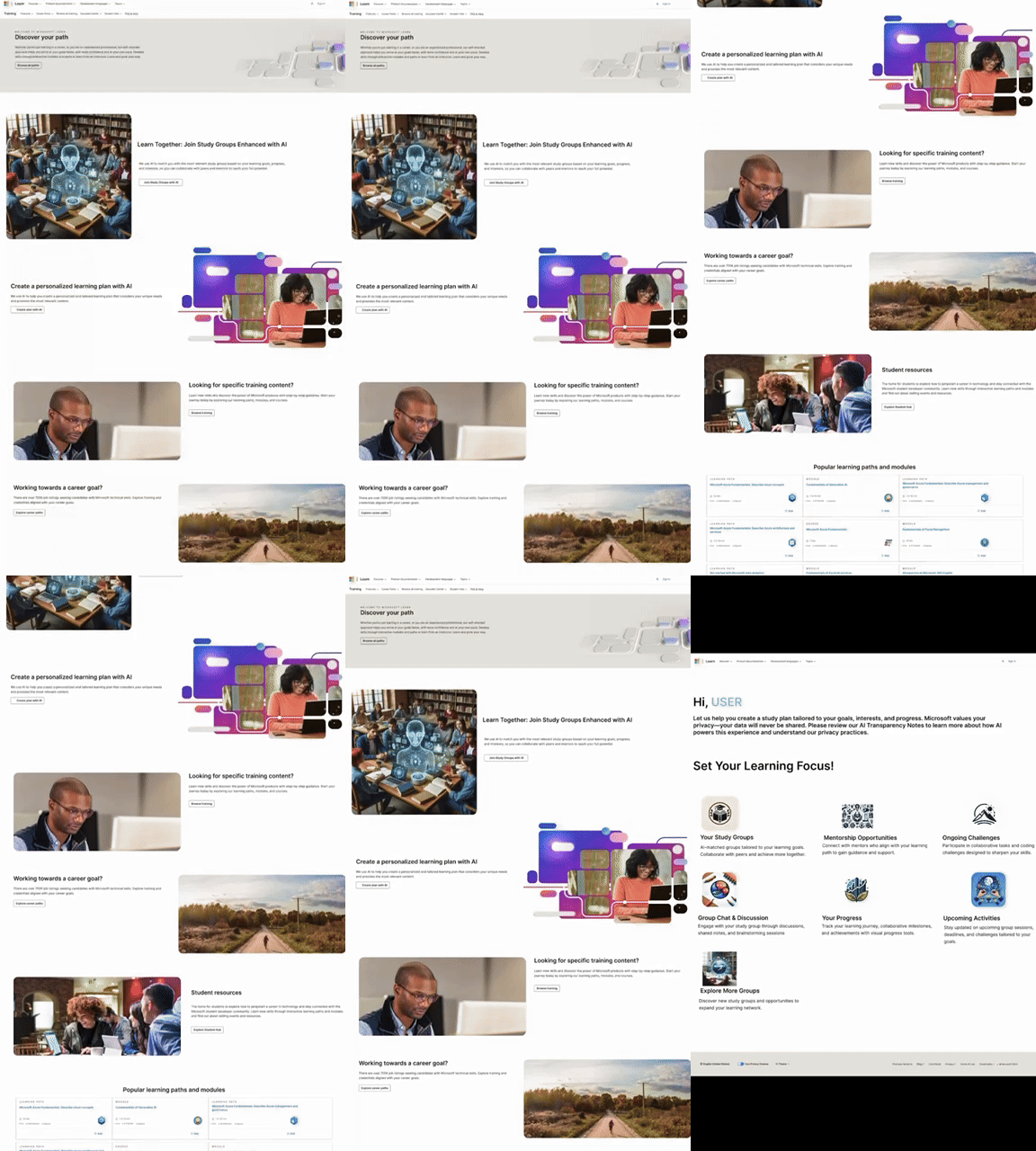
Interactive Prototype
-
Front Page Integration
The "Learn Together" feature is seamlessly introduced on the Microsoft Learn homepage, inviting users to explore AI-enhanced collaboration opportunities.
-
Dashboard
The dashboard provides a central hub for managing study groups, mentorships, challenges, and progress tracking, complete with intuitive icons and navigation.
Future Steps
-
Prototype Completion:
-
Develop interactive Figma prototypes demonstrating key user flows, including peer matching, workspace interactions, and progress tracking.
-
-
Feedback Collection:
-
Share designs with peers and mentors to gather insights on usability and feasibility.
-
-
Iterative Design and Documentation:
-
Refine features based on feedback and document the process in a detailed case study showcasing research, design decisions, and projected impact.
-
Why This Matters
Learn Together embodies the core principles of Microsoft:
-
AI-Powered Innovation: Demonstrates how AI can be harnessed to connect and empower users.
-
User-centric design focuses on solving real-world challenges with features that enhance user engagement and productivity.
-
Metrics-Driven Decision-Making: Proposes clear OKRs and KPIs to evaluate success.
-
Iterative Development: highlights the importance of feedback and refinement in creating impactful solutions.
This case study reflects my passion for leveraging technology to solve meaningful problems and my ability to conceptualize and design features aligned with user needs and organizational goals. By improving task completion rates and fostering collaboration, Learn Together could significantly enhance user retention and satisfaction on the Microsoft Learn platform